The Best Calendly Alternative for Founders in 2026
Calendly shows all your availability. Buxo shows 3 curated slots, captures intent before booking, and learns your scheduling preferences in plain English. Here is what is actually different.
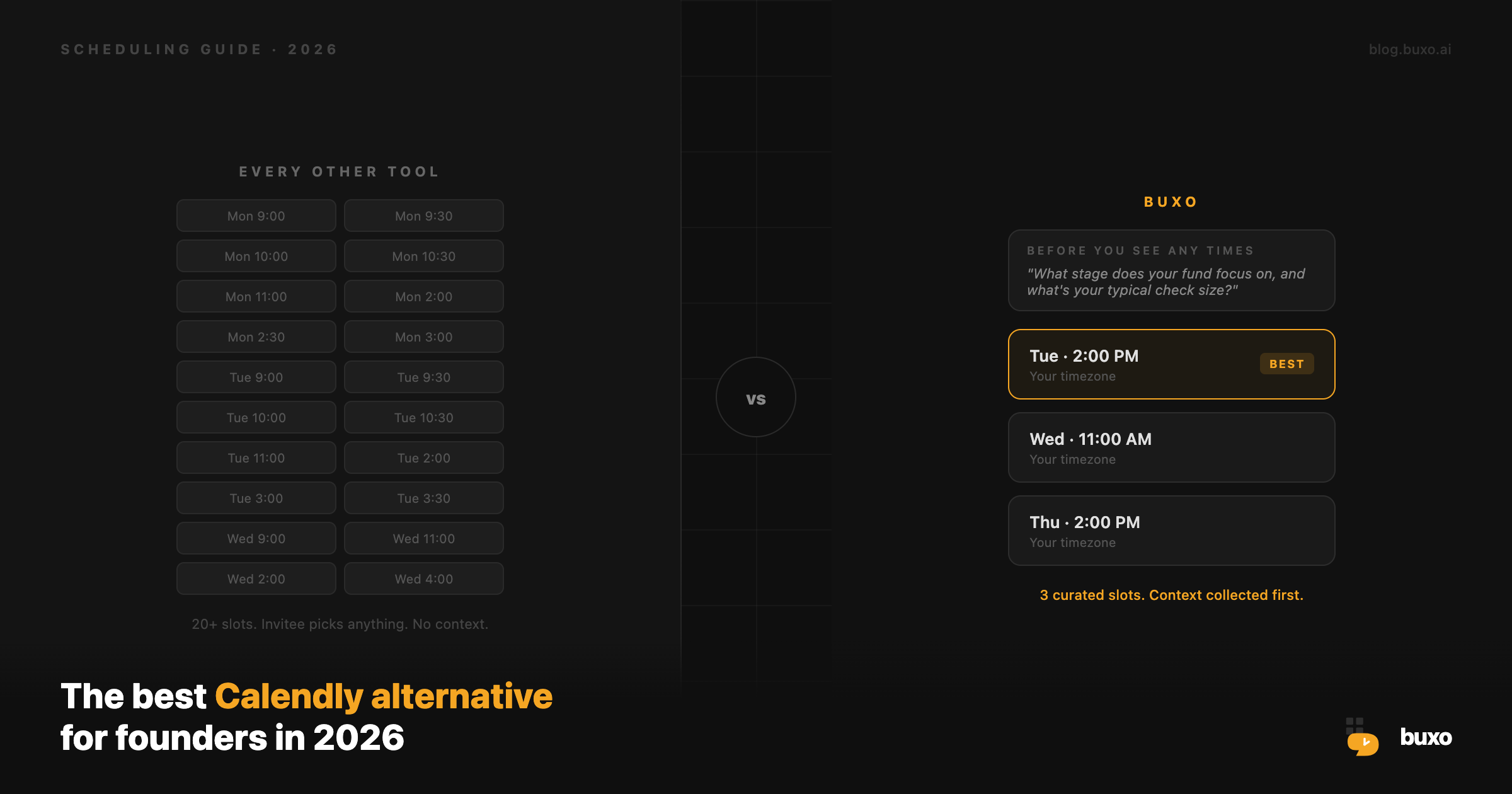
The short answer: Buxo is the best Calendly alternative for founders in 2026 if you have strong opinions about your time. It costs less, shows fewer time slots by design, and lets you train your calendar in plain English instead of toggling settings.
If you just need a simple booking link with no configuration, Calendly still works fine.
Here is what is different.
What is Buxo?
Buxo is an AI scheduling tool that lets you write your scheduling preferences in plain English and then enforces them automatically. Instead of toggling 15 settings, you type what you want:
“Keep mornings free for deep work. Batch investor calls on Tuesdays. Never show more than 3 slots at once. Ask what the meeting is about before showing any times.”
Buxo compiles those instructions into rules and applies them every time someone tries to book with you. Your invitees see a clean booking page. They pick a time. They have no idea there is a scheduling agent running behind it.
Buxo is a Calendly alternative for founders and executives who have opinions about their time, not just availability.
The core difference: 3 slots vs 30
Every Calendly booking page shows every open slot. If you have 40 open times this week, the invitee sees 40.
That feels like flexibility. It is actually a problem.
When you show 40 open slots, you are signaling that your calendar is empty. You are doing the equivalent of showing up to a negotiation and immediately accepting the first offer.
Buxo shows 3 slots. The same 3 slots to everyone, whether they are in San Francisco, London, or Singapore. Each one is displayed in the invitee’s local timezone automatically.
When one slot is booked, the next best slot appears. Like a waitlist, not a buffet.
Fewer options means faster decisions and fewer no-shows. Research consistently shows that reducing choice increases conversion. Buxo applies this directly to scheduling.
Intent capture: know the “why” before the “when”
On Calendly, someone books a time and then you find out what the meeting is about at the meeting itself.
Buxo flips this. Before an invitee sees a single time slot, they answer one question that you set: “What is this meeting about?”
For an investor pitch, you might ask: “What stage does your fund focus on, and what is your typical check size?”
For a sales demo: “What challenge are you trying to solve?”
For a hiring call: “Which role are you applying for?”
You get context before you give away calendar time. The person booking sees it as professional gatekeeping, not friction. You walk into every meeting already knowing the “why.”
Calendly has no equivalent to this. Their “questions” feature collects information after booking, not as a gate before showing times.
Plain English scheduling rules
This is where Buxo is most different from any other scheduling tool.
Calendly gives you dropdowns: buffer time (none, 5 min, 10 min, 15 min, 30 min, 45 min, 60 min). Day ranges. Time ranges. Max per day.
These cover maybe 20% of what a real founder wants. The rest, “batch calls on Tuesdays,” “no back-to-back meetings with different companies,” “VCs only get 10am to 4pm slots,” has no home in a settings menu.
Buxo replaces the settings menu with a text field. You write your preferences. The AI reads them and applies them at slot selection time.
Some real examples of what founders type in:
- “Keep Monday mornings clear for planning. Batch investor calls on Tuesdays and Wednesdays. No calls after 5pm ever.”
- “This is for podcast recordings. I need 1 hour of quiet before each one. Max 1 per day. Prefer afternoons.”
- “Group my 1:1s with direct reports on the same day. Back-to-back is fine for those.”
No dropdown covers any of that. A text field covers all of it.
Buxo vs Calendly: a direct comparison
| Feature | Buxo | Calendly |
|---|---|---|
| Slots shown to invitees | 3 curated (your best times) | All available (everything open) |
| Intent capture before booking | Yes, required gate | No (only post-booking questions) |
| Plain English scheduling rules | Yes | No |
| AI slot selection | Yes | No |
| Self-serve reschedule for invitees | Yes | Yes (paid plans) |
| Timezone detection | Automatic | Automatic |
| Round-robin team scheduling | Yes ($8.95/seat/mo) | Yes ($16/seat/mo) |
| Collective scheduling | Yes ($8.95/seat/mo) | Yes ($16/seat/mo) |
| Routing forms | Yes (Teams plan) | Yes (paid) |
| Automated reminders and follow-ups | Yes (Workflows) | Yes (Workflows) |
| Individual pricing | $7.95/mo | $10/mo (Essentials) |
| Teams pricing | $8.95/seat/mo | $16/seat/mo |
Pricing: Buxo is cheaper at every level
Individual:
- Buxo: $7.95/month
- Calendly Essentials: $10/month
- Calendly Standard: $16/month
Teams:
- Buxo Teams: $8.95/seat/month
- Calendly Teams: $16/seat/month
For a 5-person sales team, that is $44.75/month on Buxo versus $80/month on Calendly. Buxo Teams costs 44% less with comparable features.
Both Buxo and Calendly offer annual plans with roughly 15 to 17% savings.
Who should switch from Calendly to Buxo
Switch to Buxo if you:
- Have opinions about your time that go beyond “I’m free from 9 to 5”
- Run investor calls, client meetings, or interviews where context matters before the meeting
- Want to show scarcity instead of broadcasting that your calendar is wide open
- Are tired of no-shows on meetings where people picked from 40 options
- Manage a team and are paying $16/seat on Calendly
- Want automated reminders, follow-ups, and no-show recovery without paying for extra integrations
Stick with Calendly if you:
- Need a simple, one-click booking link with zero configuration
- Are an individual with very high availability who wants to show everything
- Already have complex Calendly workflows deeply embedded in your sales CRM
- Need enterprise SSO or SCIM provisioning (Buxo does not offer those yet)
One-click scheduling templates: Skills
Buxo ships with 22 pre-built scheduling configurations called Skills. Each one is designed for a specific type of meeting.
The Investor Pitch skill, for example, comes pre-configured with:
- 30-minute duration
- 24-hour lead time
- Max 3 bookings per day
- Slots only between 10am and 4pm (VIP hours)
- Instructions to cluster pitches on the same day
- An intent capture prompt: “What stage and check size does your fund focus on?”
Pick a skill, add your availability, and you have a fully configured booking link in under a minute.
Skills exist for fundraising, hiring, sales, consulting, podcast recording, healthcare, real estate, internal 1:1s, and community office hours. 22 skills across 9 categories.
Calendly has no equivalent. Every event type starts from a blank form.
Automated workflows: reminders, follow-ups, and no-show recovery
Both Buxo and Calendly let you set up automated emails around bookings. Buxo calls these Workflows.
The difference is the no-show recovery flow. When you mark an invitee as a no-show in Buxo, an automated email goes out immediately with a link to rebook. You do not have to draft a “hey, did something come up?” email yourself. It just happens.
Buxo Workflows also include:
- 24-hour reminders to invitees and hosts
- Thank-you emails after the meeting ends
- Follow-up booking requests after the call
- Resource sharing on booking (send a deck or prep guide the moment someone books)
Read more: Workflows: Automate Everything Before and After the Meeting
Team scheduling: round-robin and collective
If you are running a sales team, a recruiting team, or any team where meetings need to be distributed across people, Buxo Teams handles this at $8.95/seat versus Calendly Teams at $16/seat.
Round-robin: Your invitees see all available times across all assigned team members. Buxo assigns the team member with the lowest current meeting load who is available for that slot. No spreadsheet. No manual assignment.
Collective: Find times when every required team member is free simultaneously. Useful for partnership calls, panel interviews, or any meeting that needs multiple people.
Routing forms: Build an intake form that routes invitees to the right team member or meeting type based on their answers. “I want a product demo” goes to your sales reps. “I’m a current customer” goes to your CS team.
Read more: Buxo Teams: One Scheduling Link for Your Whole Company
How to switch from Calendly to Buxo in 5 minutes
- Create a Buxo account at buxo.ai (free to start)
- Connect your Google Calendar or Microsoft Calendar
- Pick a Skill or create a custom event type
- Set your working hours
- Copy your booking link and replace your Calendly links
Your invitees will not notice a difference. They still see a clean booking page and pick a time. What changes is everything you do not see: the slot curation, the intent capture, the AI instructions enforcing your preferences.
You can run Buxo and Calendly in parallel during the transition. There is no forced cutover.
The bottom line
Calendly is not broken. It works exactly as intended: show all availability and let people pick.
Buxo is built on a different assumption. Your time has structure and preferences that no dropdown menu can capture. Your scheduling link should reflect how you think, not just when you’re free.
If that matters to you, Buxo is the better Calendly alternative.
Start free at buxo.ai · No credit card required · Switch in 5 minutes
Related reading: Introducing Buxo: Your Calendar, Trained by You · Skills: One Click to a Fully Configured Scheduling Link · Buxo Teams: One Scheduling Link for Your Whole Company